Sunday, February 13, 2011

iPhone dev Stupidity 143: Size of Image Cut from CGContext

UIGraphicsBeginImageContext(scale_rect.size);
[self drawInRect: scale_rect];

UIImage * thumbnail = UIGraphicsGetImageFromCurrentImageContext();

UIGraphicsEndImageContext();

CGContext will always round to ceiling - trying to hold all drawings.

That means: scale_rect.size.width == 320.00000031 will be rounded to 321. If your app care that 1 point, it’ll cause error.

Friday, February 11, 2011

iPhone dev Stupidity 142: Silencing deprecation warnings

from here:
#pragma GCC diagnostic ignored "-Wdeprecated-declarations"

Wednesday, February 02, 2011

iPhone dev Stupidity 141: applicationWillTerminate: in iOS4 & iOS3

From the iPhone Application Programming Guide:
Even if you develop your application using iPhone SDK 4 and later, you must still be prepared for your application to be terminated. If memory becomes constrained, the system might remove applications from memory in order to make more room. If your application is currently suspended, the system removes your application from memory without any notice. However, if your application is currently running in the background, the system does call the applicationWillTerminate:method of the application delegate. Your application cannot request additional background execution time from this method.
So yes, applicationWillTerminate: will generally not be called very often in iOS 4. If you have to save data, you should do so in both applicationWillTerminate: andapplicationDidEnterBackground:

Friday, January 28, 2011

iPhone dev Stupidity 140: encode CGRect into NSUserDefaults

from stackoverflow:
There exists a pair of functions NSStringFromCGPoint and CGPointFromString. You can use these to produce an array of strings representing the points for serialization, and then convert back when you're finished.

Tuesday, January 18, 2011

Monday, January 17, 2011

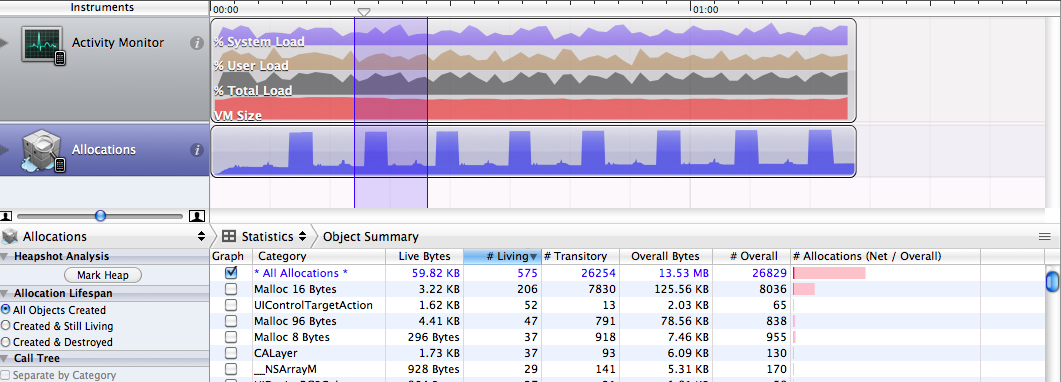
iPhone dev Stupidity 137: Understanding instruments allocations


ObjectAlloc tracks all memory allocation and deallocation over the time your program is running.
The Living bytes, or Net bytes is how much memory your application is using at the time you select in the timeline. That will include leaked memory, since leaked memory is never deallocated.

#Living is how many allocations of a certain size/object type happened (and are still allocated). This is very useful when looking for leaks. For example, if you repetitively perform an action (like coming in an out of a modal view controller), and you see that #Living of an object grows by the same amount each time, then you’re probably leaking those objects. You can then confirm by drilling down and seeing the exact line of code that is allocating the objects, and even see the time index each one was created.

Overall bytes includes memory that has been released. It’s useful to track that number for performance optimization purposes, but not if you’re just trying to see your current memory footprint or look for leaks.

http://stackoverflow.com/questions/2154219/instruments-objectalloc-explanation-of-live-bytes-overall-bytes

Saturday, January 15, 2011

iPhone dev Stupidity 136: Two stage animation warning

Since iOS 4.0 you got this warning when present a camera picker controller:

Using two-stage rotation animation. To use the smoother single-stage animation, this application must remove two-stage method implementations.

The real cause is from stackoverflow:
This message will appear if you have are presenting the UIImagePickerController within another UIViewController. Because it isn't pushed like a UINavigationController stack, there is confusion at the UIWindow level. I don't know if the warning is a problem, but to eliminate the warning you can do the following:

// self = a UIViewController
//

- (void) showCamera
{
cameraView = [[UIImagePickerController alloc] init];
[[[UIApplication sharedApplication] keyWindow] setRootViewController:cameraView];
[self presentModalViewController:cameraView animated:NO];
}

- (void) removeCamera
{
[[[UIApplication sharedApplication] keyWindow] setRootViewController:self];
[self dismissModalViewControllerAnimated:NO];
[cameraView release];
}

There’s also a good point for iOS 4.x:

Perhaps you are adding the root UIViewController's view as a subview of the window instead of assigning the view controller to the window's rootController property?

Tuesday, November 23, 2010

iPhone dev Stupidity 135: Codesign error

Codesign error: Provisioning profile cannot be found after deleting expired profile

Sometimes your xcode project file gets messed up, especially if you have an old project and first created it with an older version of xcode/iphone sdk. What you need to do is open up the project file in a text editor, search from the long sting and manually erase that line. In fact, you should just go aead and erase any line that points to any provisioning profiles. Then reopen the project in xcode, go to the settings are reselect your new profile. This clears up issues like that most of the time The lines that point to the provisioning profiles will look like this:


PROVISIONING_PROFILE = "487F3EAC-05FB-4A2A-9EA0-31F1F35760EB";
"PROVISIONING_PROFILE[sdk=iphoneos*]" = "487F3EAC-05FB-4A2A-9EA0-31F1F35760EB";

iPhone dev Stupidity 134: Core Animation doc reading

* CALayer must be hosted with UIView. UIView provides the event-handling for underlying layers, while the layers provide display of the content.
  - for iPhone UIView.layer
  - for Mac OS, you need to enable it: theView.wantsLayer = YES

* Sublayers do not clip to parent by default (UIView does). To enable, theLayer.masksToBounds = YES

* To position content image in a CALayer:
  - kCAGravityResize
  - kCAGravityResizeAspect
  - kCAGravityResizeAspectFill

  will do a much better job than write your own resize & fill code

* You can stop an animation by: removeAnimationForKey:

* AffineTransform类描述了一种二维仿射变换的功能,它是一种二维坐标到二维坐标之间的线性变换,保持二维图形的“平直性”(译注: straightness,即变换后直线还是直线不会打弯,圆弧还是圆弧)和“平行性”(译注:parallelness,其实是指保二维图形间的相对位置关系不变,平行线还是平行线,相交直线的交角不变。)。仿射变换可以通过一系列的原子变换的复合来实现,包括:平移(Translation)、缩放(Scale)、翻转(Flip)、旋转(Rotation)和错切(Shear)。

* When an instance of CAAnimation receives the runActionForKey:object:arguments: message it responds by adding itself to the layer’s animations, causing the animation to run:

- (void)runActionForKey:(NSString *)key 

                 object:(id)anObject 

              arguments:(NSDictionary *)dict 

{ 

     [(CALayer *)anObject addAnimation:self forKey:key]; 

} 


iPhone dev Stupidity 133: switch action for button

UIControl's addTarget:action:forControlEvent: method will allow multiple listeners be added.

If you just care about one listener and want to switch to another action, check this:

@implementation UIButton (Ext)


- (void) switchToAction: (SEL) newSelector forControlEvents: (UIControlEvents) event{

// get the old target/action pair

NSSet * targets = [self allTargets];

assert(targets.count == 1);

id target = [targets anyObject];

NSArray * action_strs = [self actionsForTarget: target forControlEvent: event];

assert(action_strs.count == 1);

NSString * action_name = [action_strs objectAtIndex: 0];

SEL action = NSSelectorFromString(action_name);

// remove it

[self removeTarget: target action: action forControlEvents: event];

// set new selector

[self addTarget: target action: newSelector forControlEvents: event];

}


@end


iPhone dev Stupidity 132: Sending picture attachment via email

using MFMailComposeViewController:

// Attach image data to the email
// 'CameraImage.png' is the file name that will be attached to the email
[picker addAttachmentData:data mimeType:@"image/png" fileName:@"CameraImage"];

Yes. You can attache multiple images.

iPhone dev Stupidity 131: Quartz 2d coords

from Apple Doc:

Because you use a lower-left origin when drawing into a bitmap or PDF context, you must compensate for that coordinate system when rendering the resulting content into a view. In other words, if you create an image and draw it using the CGContextDrawImage function, the image will appear upside down by default. To correct for this, you must invert the y-axis of the CTM (by multiplying it by -1) and shift the origin from the lower-left corner to the top-right corner of the view.

If you use a UIImage object to wrap a CGImageRef you create, you do not need to modify the CTM. The UIImage object automatically compensates for the inverted coordinate system of the CGImageRef type.

Thursday, June 10, 2010

iPhone dev Stupidity 130: antialiasing on a rotated view

from stackoverflow:

For a UIImageView, add a one-pixel transparent border around the image. This will cause the edges of your image to be on the "inside", and because the inside pixels are interpolated when rotating, the borders will magically become antialiased. This also works for rotating UIButtons that have a custom image.

Wednesday, June 09, 2010

iPhone dev Stupidity 129: -all_load -ObjC linker flag in Xcode

From Apple Q&A

Q: Why do I get a runtime exception of "selector not recognized" when linking against an Objective-C static library that contains categories?

A: The "selector not recognized" runtime exception occurs due to an issue between the implementation of standard UNIX static libraries, the linker and the dynamic nature of Objective-C. Objective-C does not define linker symbols for each function (or method, in Objective-C) - instead, linker symbols are only generated for each class. If you extend a pre-existing class with categories, the linker does not know to associate the object code of the core class implementation and the category implementation. This prevents objects created in the resulting application from responding to a selector that is defined in the category.

To resolve this issue, the target linking against the static library must pass the -ObjC option to the linker. This flag causes the linker to load every object file in the library that defines an Objective-C class or category. While this option will typically result in a larger executable (due to additional object code loaded into the application), it will allow the successful creation of effective Objective-C static libraries that contain categories on existing classes. Follow these steps to pass -ObjC to the linker:

  1. In Xcode, double-click the target's name under "Targets" in the Project window.

  2. Choose the Build pane from the ensuing Info window.

  3. Scroll down to the Other Linker Flags build setting under the Linking collection and set its value to -ObjC.

Figure 1: Target Build pane: Other Linker Flags

Figure 1, Target Build pane: Other Linker Flags

IMPORTANT: For 64-bit and iPhone OS applications, there is a linker bug that prevents -ObjC from loading objects files from static libraries that contain only categories and no classes. The workaround is to use the -all_load or -force_load flags.

-all_load forces the linker to load all object files from every archive it sees, even those without Objective-C code. -force_load is available in Xcode 3.2 and later. It allows finer grain control of archive loading. Each -force_load option must be followed by a path to an archive, and every object file in that archive will be loaded.


iPhone dev Stupidity 128: Photo orientation issue in Three20’s TT

from stackoverflow:

You probably set size: attribute of the photoSource to some wrong value.

Edit: Unfortunately i don't have another suggestion for your problem, however i have a warning. You should definitely scale your image before display, 1536x2048 is way too large for iphone to handle, and totally unnecessary for a 320x480 screen. Otherwise you are sure to have app crashes due to low memory in the future - if not now.

iPhone dev Stupidity 127: How Three20 works

1. Create TTThumbesViewController via URL: "tt:\\phototest2"


2. When is the TTURLMap setuped?


3. And mapped to class


  [map from:@"*" toViewController:[TTWebController class]];

  [map from:@"tt://catalog" toViewController:[CatalogController class]];

  [map from:@"tt://photoTest1" toViewController:[PhotoTest1Controller class]];

  [map from:@"tt://photoTest2" toViewController:[PhotoTest2Controller class]];


4. How TTThumbsView get created?


5. URL protocol


The URL "protocol" for the bundled files is bundle:// 
while the one for the files in the documents directory is documents://

6. A Tutorial on How to create a photo browser using Three20

Most of the code is just copied from the TTCatalog sample code.


iPhone dev Stupidity 126: private folder for images

Saving image directly to the folder

//I do this in the didFinishPickingImage:(UIImage *)img method

NSData* imageData = UIImageJPEGRepresentation(img, 1.0);


//save to the default 100Apple(Camera Roll) folder.  

[imageData writeToFile:@"/private/var/mobile/Media/DCIM/100APPLE/customImageFilename.jpg" atomically:NO];

The photos there are all named in IMG_####.JPG format.

There's also a .MISC folder which contains the thumbnail for each image.

To inspect the folder: 

NSArray *directoryContent = [[NSFileManager defaultManager] directoryContentsAtPath:@"/private/var/mobile/Media/DCIM/100APPLE/.MISC"];

for(NSString * dir in directoryContent){

NSLog(dir);

}


iPhone dev Stupidity 125: lack of EXIF with the iPhone API

UIImageWriteToSavedPhotoAlbum will strip all the comments/etc off. Tried several way and failed, and read this:

"The problem actually lies with UIImage, the data parameter that feeds into UIImageWriteToSavedPhotosAlbum. UIImage actually strips off any extra EXIF information on the image, even if you try to add them with library such as iphone-exif.

To save an image with EXIF using iphone-exif, you would have to add the extra EXIF information to an NSData representation of the UIImage and write the file directly to disk. However, with the available API, you can only write to the PhotoAlbum using UIImageWriteToSavedPhotosAlbum, which only accept UIImage. Once you convert the NSData back to an UIImage, all the EXIF information is lost again! And we are back to square one."

iPhone dev Stupidity 124: Rotating view around arbitrary point th

From here:

"I have a UIImageView that I want to rotate around a given point. By default, the layer will rotate around the center of the UIImageView. Trying to change this anchor point involves a bit of work, either move at the beginning and reposition all the view elements, or translating the view, rotating, and translating back. The last option works fine, unless you are trying to use core animation to smoothly rotate the view.

I found out a much easier solution to the whole problem. You could call it a workaround, but it works well without disturbing the view you want rotated.

Basically, you create a new UIView. Place the center point where you want the rotation to occur. Change the size of the view so that the view you want rotated will fit inside. Make your view (you want rotated) a subview of the new view. Now, just rotate the new view, and your subview will be rotated correctly.

Example: lets say we have a UIImageView that is 320x480 (the size of the whole iPhone screen). We want it to rotate from the bottom center instead of its middle. Create a new UIView that is 0,0,320,960. This is basically double the height of the screen, positioned so the bottom half is off the screen, which places the center point right where we want it. Now place your UIImageView inside the new UIView in the top half (visible on the screen.) Now when you rotate the UIView, it will pivot on the bottom center of the screen, and your UIImageView will rotate along with it, as expected."

Instead of adding a parent view, you can also adjust the size of the view itself if feasible.

iPhone dev Stupidity 123: How to launch iPhone Camera on viewDidL


You should do it in viewWillAppear:, or viewDidAppear: if the first doesn't work. trying to do it in viewDidLoad won't work because that is called after the view is first created, and the view isn't a subview of anything else at that point. 

As far as i understand it, in order to call presentModalViewController on self, the view must at some level be displayed in the UIWindow.

And some solutions on camera shutter animation:


The movie files are too big ~ 7MB ~ to fit here.


UIImageView animationImages

imageView.animationImages = [NSArray arrayWithObjects:
                                     
[UIImage imageNamed:@"cameraScreenOverlay1.png"],
                                     
[UIImage imageNamed:@"cameraScreenOverlay2.png"],
                                     
[UIImage imageNamed:@"cameraScreenOverlay3.png"],
                                     
[UIImage imageNamed:@"cameraScreenOverlay4.png"],
                                     
[UIImage imageNamed:@"cameraScreenOverlay4.png"],
                                     
[UIImage imageNamed:@"cameraScreenOverlay4.png"],
                                     
[UIImage imageNamed:@"cameraScreenOverlay3.png"],
                                     
[UIImage imageNamed:@"cameraScreenOverlay2.png"],
                                     
[UIImage imageNamed:@"cameraScreenOverlay1.png"],
                                     
nil];
        imageView
.animationDuration = 1.0;
        imageView
.animationRepeatCount = 0;
       
[imageView startAnimating];

doesn't work when imageView is used as an overlay view above camera.


Not sure how he had done it - snapshoting each frame of the camera animation?